
WINDOWS
Every tool has its own
Rotoscoping (Shift+R), motion tracking (Shift+U), transitions (Shift+X) and the audio effects pedalboard (Shift+B): windows drawn for their settings, instead of long sections in the inspector.
 CYPLOS
STUDIO
VERSION 1.59.0 · WINDOWS · LINUX 1.61 COMING
CYPLOS Studio is non-linear video editing software built for glitch art: a multitrack timeline, nearly a hundred effects that animate, a Sound Design station, and two stage applications, CYPLOS Datamosh and CYPLOS VJ.
1.61 figures, counted in the software.
00TRAILER
Breakage sequencer, failing-hardware sound effects, the Sound Design station, 3D effects, keying and motion: what's new in 1.60, coming soon, filmed and rendered in the software. Headphones recommended: the music runs through the station's real audio effects.
KNDSHORT FILM
KANDISHA: AWAKENING, the short film by the production company Kandisha, was edited entirely in CYPLOS Studio on .
1.61PREVIEWS
Screenshots of version 1.61, taken in the software itself, on its demo projects, untouched. It can't be downloaded yet: the online version is still 1.59.0, and the subscription will include 1.61 as soon as it's out.
WINDOWS
Rotoscoping (Shift+R), motion tracking (Shift+U), transitions (Shift+X) and the audio effects pedalboard (Shift+B): windows drawn for their settings, instead of long sections in the inspector.
SPACES
Each top tab has its own living icon and panel: the roto / tracking workshop, the glitch lab, mixing or the pedalboard. The effects inspector is more compact.
THEMES
Two new animated themes, next to CYPLOS and Futuristic neon. With reduced animations, their backdrop stays still.
TEMPO
The tempo detected to a tenth of a BPM, the LED on the grid, every rhythmic effect synced in one click, a marker at each bar.
TIMELINE
Holding the playhead, you hear the sound at that point (optional). Clearly visible color labels, a silent rhythm ribbon when there's no sound, a clean status bar in one click.
LANGUAGES · FIXES
The whole interface in English and Polish. Knobs finally reach both ends, and DEMOS, HELP or ENTER no longer freeze the software with independent windows.
01WHAT'S NEW
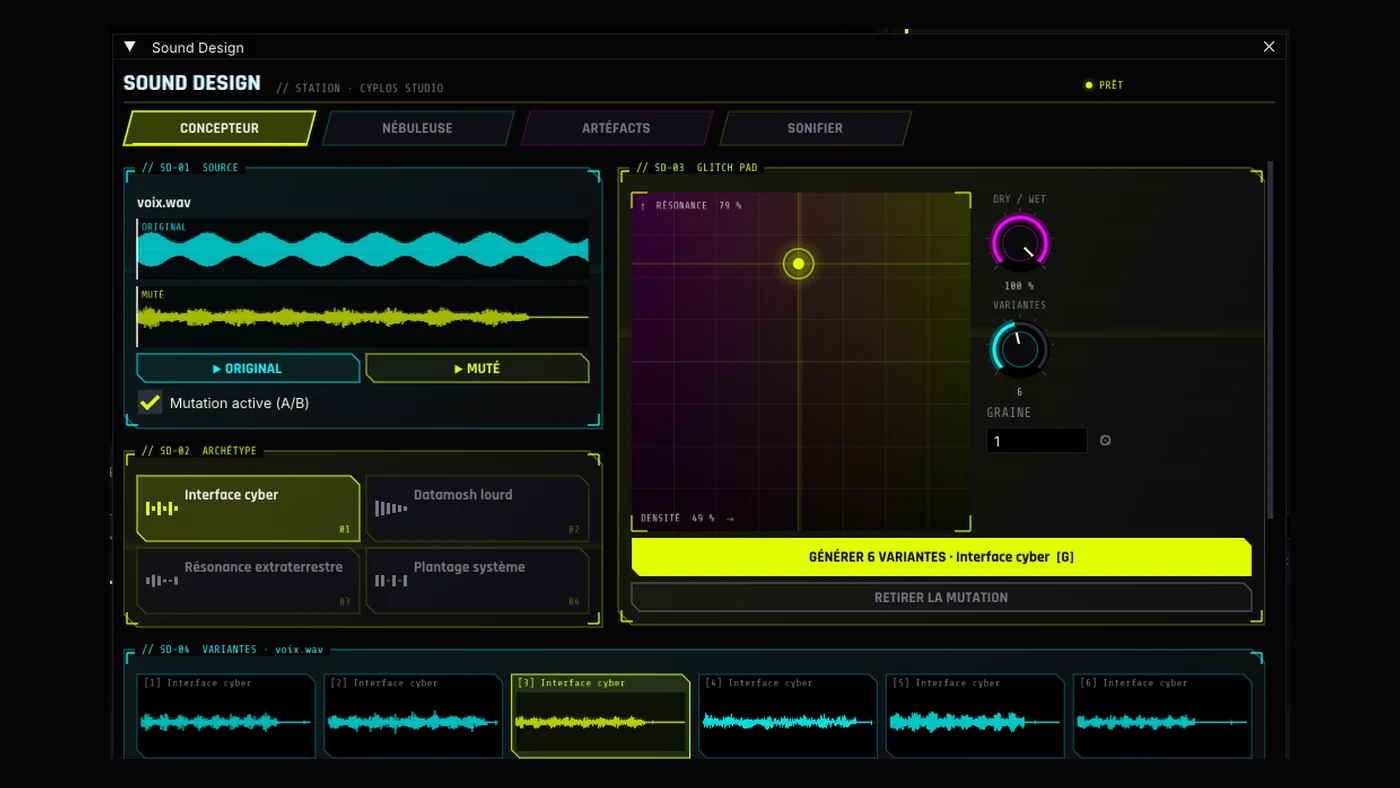
Coming soon in CYPLOS Studio, with 1.60 then 1.61 (see the previews): a whole sound design station — synthesized sounds, glitch variants of your own sounds, a real-time granular processor, a spectral lab and loudness to broadcast standards. On the image side, the Cyberpunk-style title glitch and neon trails. Meanwhile, version 1.59 is ready to download, and on this site two workshops can be tried right now, image and sound.
COMING SOON · 1.60
A window of its own (F12), with a holographic design: the sound designer mutates your clips into glitch variants that you listen to, compare and evolve generation after generation; Nebula cuts sound into grains in real time; the lab hides a message in a spectrogram, hybridises two sounds and spins sound around your head on headphones. All on knobs, all animatable.
New lab on the site: your photo through seven of the software’s effects, a PNG to download and a real glitch code to paste into CYPLOS Studio.
Open the lab → CYG1A clip’s whole effect stack in one line of text, to share. Ten ready-to-paste codes in the gallery, rendered by the real engine.
See the gallery → ♪A BSKA track run live through nine audio glitches: bitcrusher, beat repeat, tape stop, reverse… each with its own animation.
Listen →Fifty-nine versions released, from 1.0 to 1.59, then 1.60 and 1.61 on the way. Open one to read its notes.
cyplos-studio-cli diagnostic writes a full report of a project on your machine.--datamosh / --vj, F7 / F8).02EFFECTS
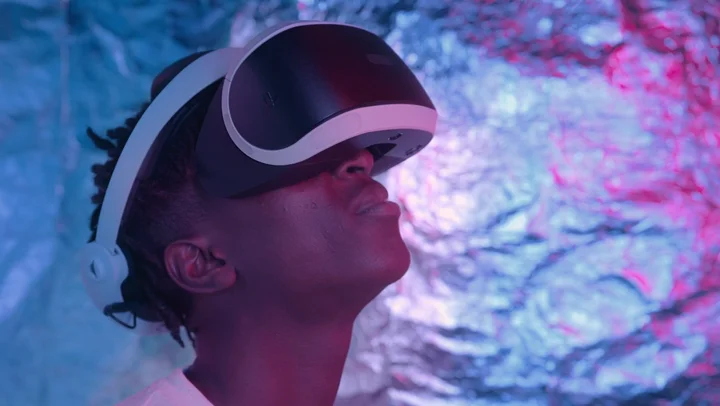
Every image below comes out of cyplos-studio-cli effet, the software's command line, applied to the same reference image: a frame taken from video footage, untouched. Drag the line to compare. Further down, the effects in motion and the glitch code gallery are rendered on that same footage.

GLITCH
Asendorf's glitch: the pixels of a line sorted between two thresholds. Straight lines at any angle, rays, circles, spirals or waves; the histogram stays identical.
$ cyplos-studio-cli effet tri_pixels source.png sortie.png
QUICK GLITCH
Worn VHS, lost signal, datamosh, crashed driver, scrambled frequencies, abyss, audio databending, broken glass… The glitch intensity (0 to 100 %, animatable) drives every linked setting in the stack. Glitch the cuts, scatter glitches and tempo remix glitch a whole edit in one go.
ADVANCED MODE
Blend over the original, R G B A channels, modulation (sine, square, sawtooth, drift), bursts. MUTATE and TOTAL CHAOS randomise deterministically, and undo with Ctrl+Z.
ZONES
Limit any effect to the keyed subject or background (with or without AI), to a rotoscoping mask, to the near / far of the depth map, or to a tonal zone: highlights, shadows, a hue, what moves, what stays still, the edges.
IN MOTION · VIDEO RENDERS
Three seconds of the reference footage, rendered by cyplos-studio-cli rendre: the time-based and animated effects of versions 1.21 to 1.26, exactly as the software outputs them.
NEW · VERSION 1.25
A stack of effects fits in one line of text starting with CYG1-. Copy a code, then in the software's inspector, click COLLER UN CODE (paste a code): the effects are added to the clip, settings included. Share your own stacks the same way with COPIER LE CODE (copy the code). Each video is the code itself, read back by the software and applied to the reference footage.
GLITCH STYLE
The graphics card giving up: corrupted memory, damaged sensor, channels drifting apart.
GLITCH STYLE
Lines sent through the frequency domain: scrambled phases, fringes, stepped colours.
GLITCH STYLE
The image falling into itself: spinning recursion, moiré, shifted colours.
GLITCH STYLE
The worn-out tape: drift, snow, colour bleed, a shaking picture.
GLITCH STYLE · 1.26
The image's bytes run through an audio echo: offset ghosts, colours bleeding from one channel into another.
GLITCH STYLE · 1.26
The screen gives way under an impact and loses sync: cracks, sliding shards, a torn image.
RECIPE
Only what moves falls apart: frozen bands, memory corrupted in bursts.
RECIPE
Rutt-Etra phosphor scan lines, RGB ghosts and glow.
RECIPE
Damaged frequency blocks, lines read back wrong and bytes processed as sound.
RECIPE · 1.26
The image read like a scratched record, an old TV that rolls and tears in bursts.
Glitch codes arrive with version 1.25; those using the 1.26 effects (Audio databending, Broken glass, Sonified tape) need 1.26.
NEW · ON THE SITE
Drop a photo: it stays in your browser, nothing is uploaded. Stack the software’s effects, tune them, download the result, then copy the glitch code: pasted into CYPLOS Studio (PASTE A CODE), it renders the same stack with the real engine. You can also paste a code from the gallery to take it apart.
FXEFFECT STACK
CYG1GLITCH CODE
The preview recreates the effects in the browser; the code is rendered by the real engine in the software (glitch codes: version 1.25 or later). Pixel settings are those of a 1920 × 1080 project.
03CYPLOS DATAMOSH · F7
In a compressed stream, a P-frame only describes how blocks move. Remove the keyframe that follows a cut: the motion of the new shot drags the pixels of the old one.
cyplos-studio-cli mosh-codec, CYPLOS Studio 1.26): I-frames removed at the cuts, each shot's motion pushes the pixels of the previous one.TRY IT · STREAM MAP
3 I-FRAMES · 0 REMOVED
I keptI removedPP replayed

cyplos-studio-cli mosh-codec projet.cyps sortie.avi --floraison 8.In the editor, the Datamosh effect imitates the phenomenon without a codec, with eight algorithms (ghost, bloom, freeze, reverse, swirl, swap, melt, transfer), keyframes removed at markers or at shot changes, and a mosh map (light, dark, near, far, subject, background). It also works as a cross transition.
04CYPLOS VJ · F8
Two decks, a crossfader, tempo-locked effects, all from the keyboard, and an autopilot that plays on its own, in time. When the night is over, the performance becomes a project to edit.
WebGL unavailable: the demo needs the graphics card.
MINI VJ · WEB DEMO
CYPLOS VJ's keys, right here on the site: A Z E R T for the effects, Space to tap the tempo, B for blackout.

05DEPTH SCANNER · 3D PROJECTION · MOTION
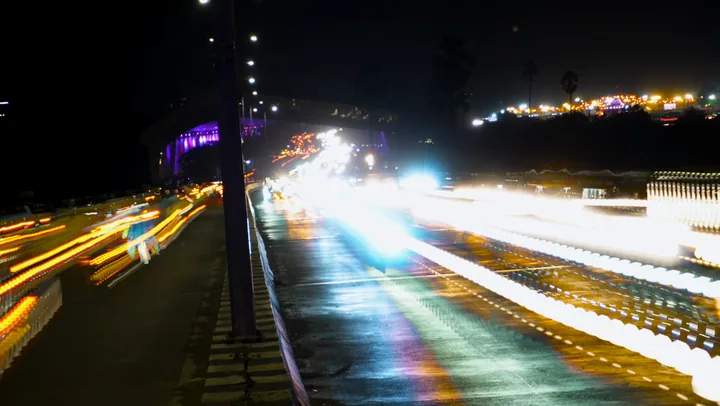
No neural network weighing hundreds of MB: depth comes from cues (perspective, haze, sharpness, keyed subject, light), smoothed along the edges.

DEPTH SCANNER
Greyscale or colour map (Turbo, Magma, neon, thermal), fog, depth of field, slice, sweep, contour lines, anaglyph, near / far grading. The map also serves as a zone for effects, datamosh and pixel sorting.
3D PROJECTION
Above, a frame from footage, subject keyed by AI, in vertigo. Ten scenes (floor, corridor, tunnel, relief, keyed subject, depth map…) and ready-made moves: push-in, tracking, orbit, vertigo, float. 50 to 100 ms per frame in 1080p.
MOTION DESIGN
Ease In, Ease Out, Overshoot, Bounce and Elastic curves; in and out presets; vector shapes with progressive stroke; letter-by-letter animated titles.
20 GENERATORS
Plasma, tunnel, code rain, sound visualiser, glitch layers, camcorder overlay, and a retro interface (error cascade, blue screen, progress bar stuck at 99%) entirely drawn by the software.
06THE WORKSHOP
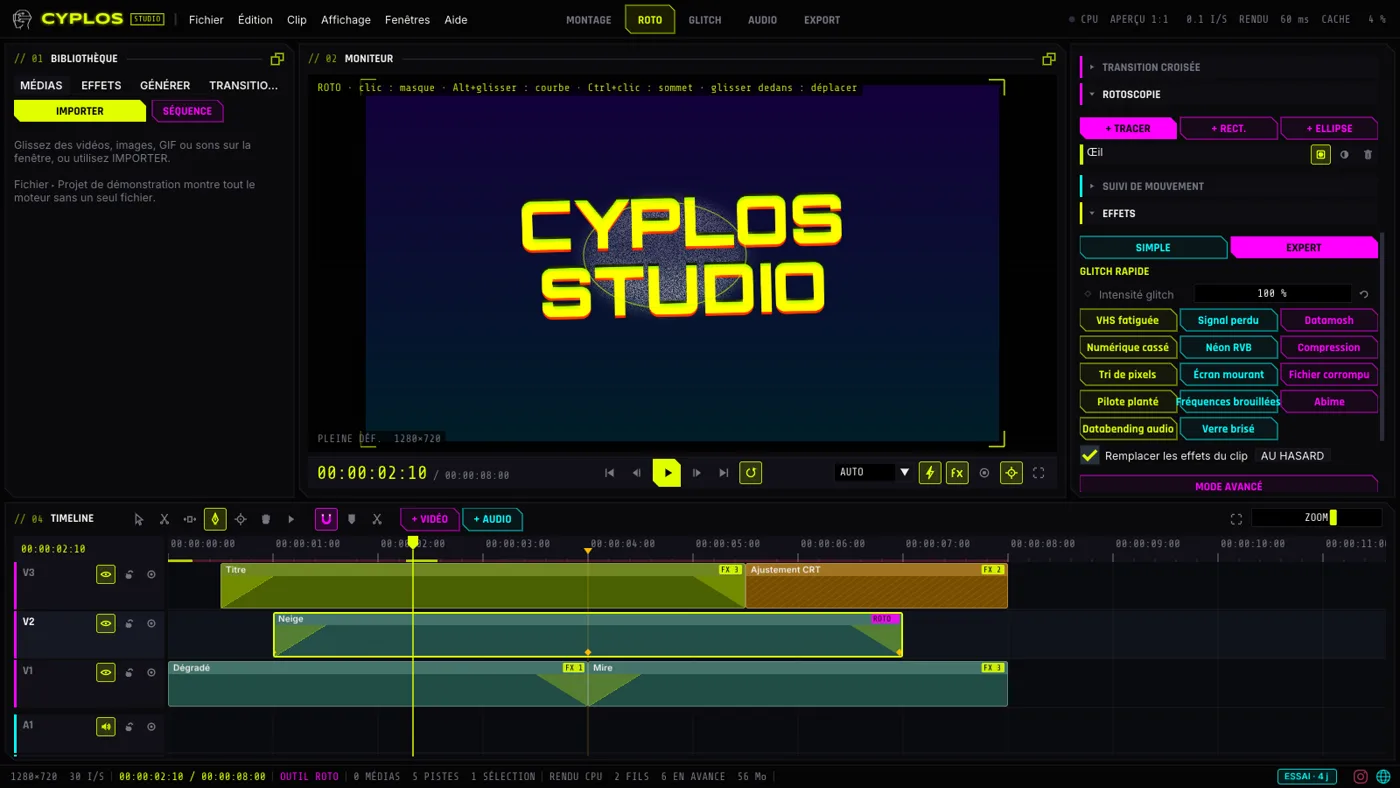
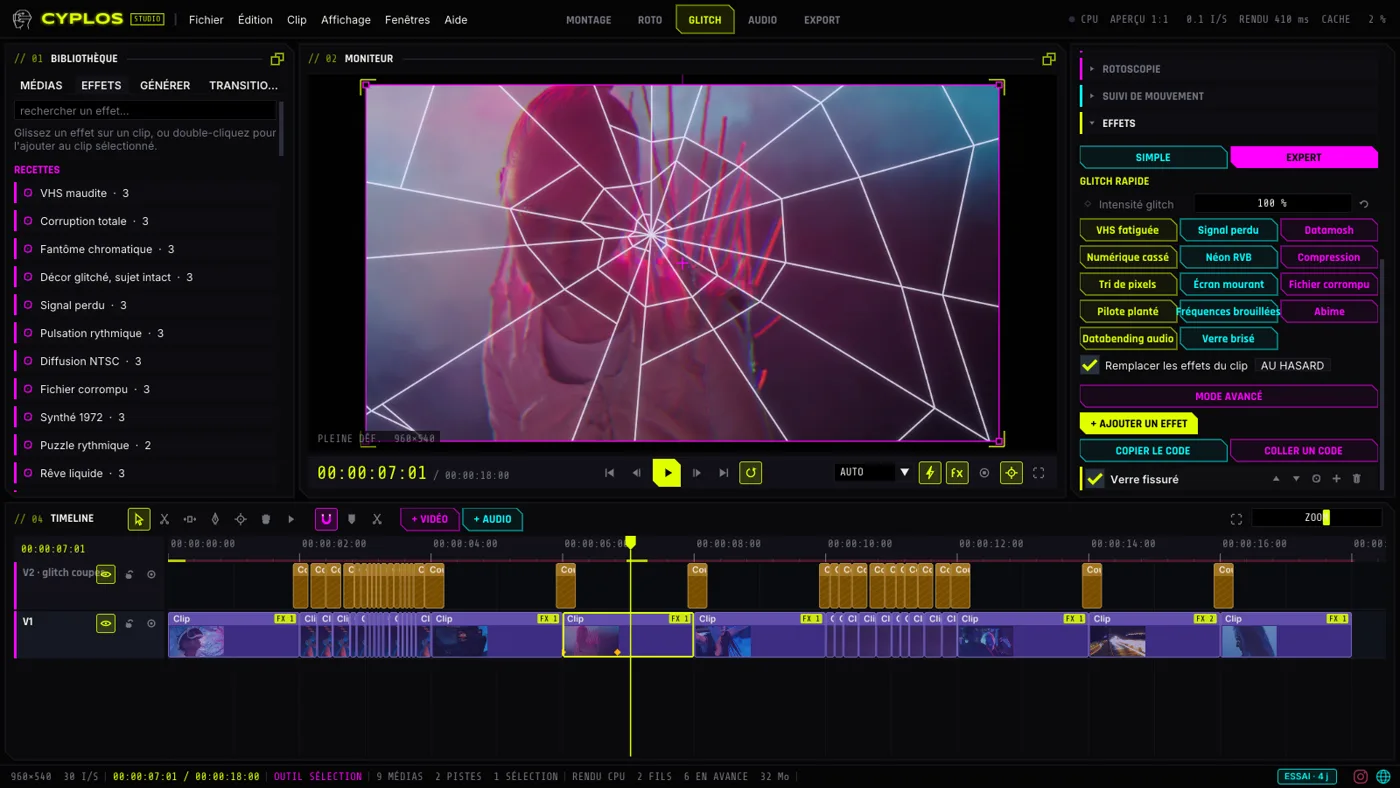
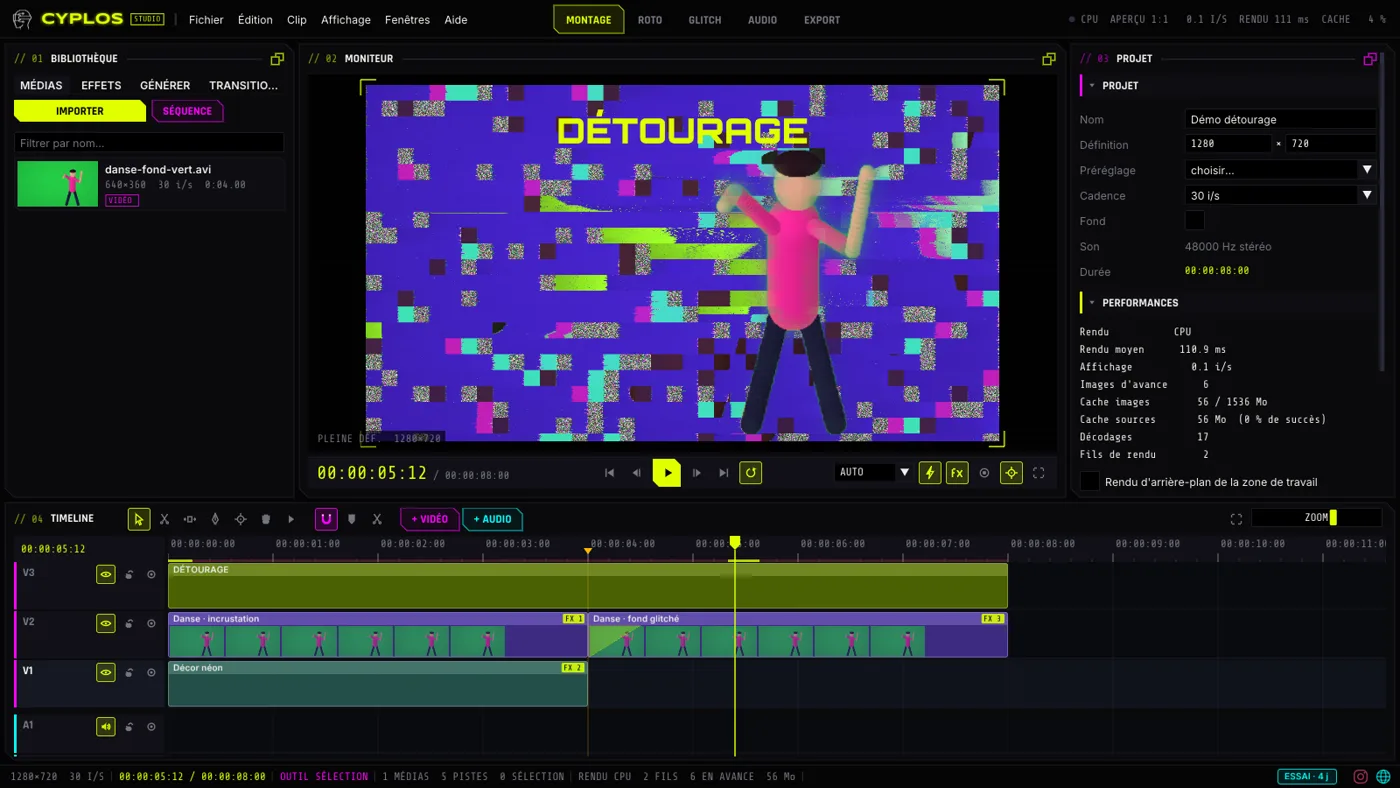
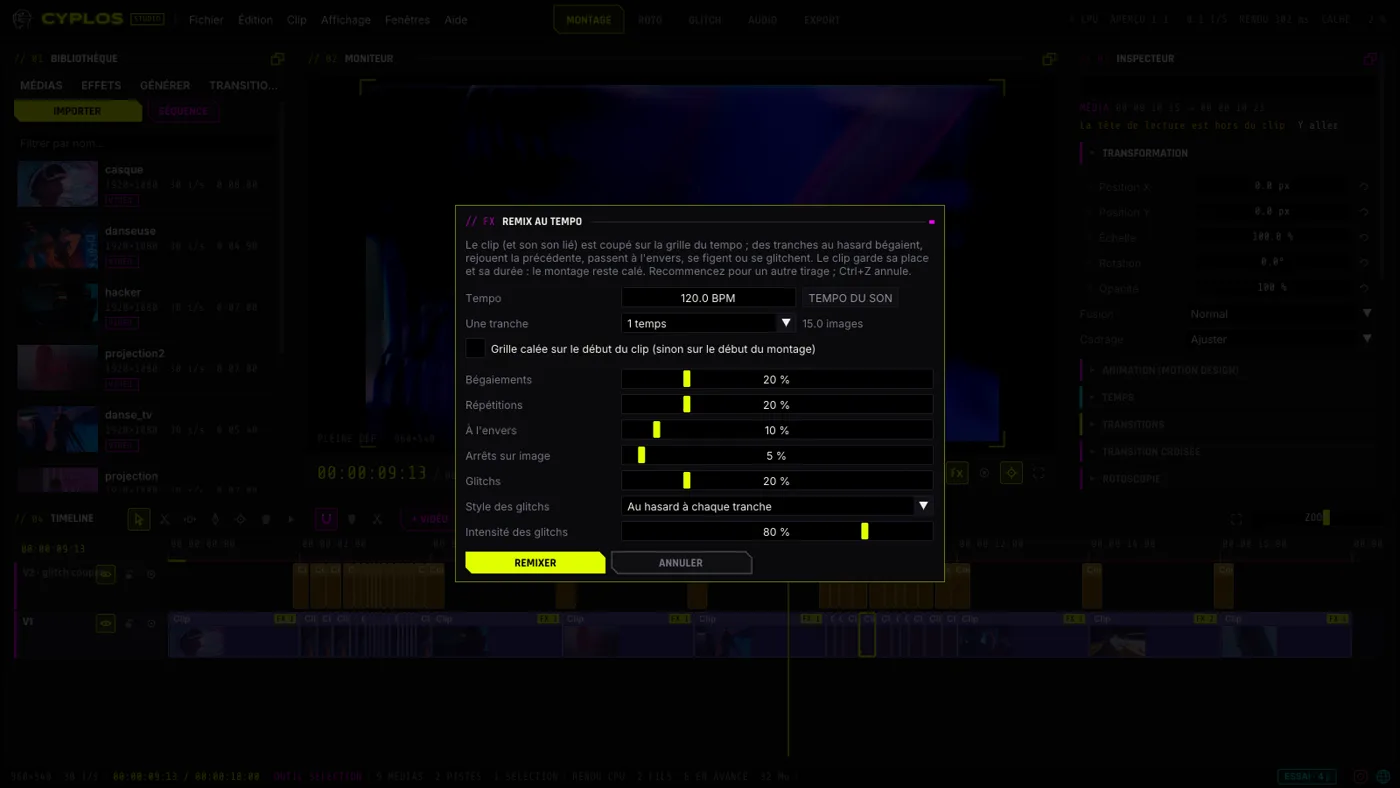
Multitrack timeline, keyframes everywhere, rotoscoping, motion tracking, AI keying, tempo remix. Five workspaces: MONTAGE, ROTO, GLITCH, AUDIO, EXPORT. Screenshots of version 1.26.

EDITING
Video tracks as layers (blend, opacity), razor, slip, forward select, snapping, speed from 5 to 2000 %, freeze frame, shot-change detection, tempo remix (stutters, repeats, reversals on the tempo grid), 300 undos.
ROTO · TRACKING
Animated Bézier masks, onion skin, feather and expansion. Sub-pixel trackers: stabilise a shot, make a title follow, blur a face in one action.
AI KEYING
U²-Net network run by an inference engine written for the software (SSE / AVX2), about 0.5 s per frame on 4 cores. 4.4 MB model, downloaded once, checksum verified.
TOOL WINDOWS · F1 TO F10
Every tool window detaches, just like the panels.
07AUDIO
AUDIO LAB · LIVE
AMSTERDAM — BSKA RMX GLITCH ENDThe sound on the left, with no effect. Pick an effect: it applies in real time, like in the software’s mixer.
08PHOTOSENSITIVITY · ACCESSIBILITY
Glitch easily produces flashes that can trigger seizures in people with photosensitive epilepsy. CYPLOS Studio finds them and softens them.
F6 · ANALYSIS
More than three flashes per second, or saturated red flashes (based on WCAG 2.3.1): the list, jump to them, turn them into markers. Export warns you if any are left.
FLASH LIMITER
Each area of the image stays close to the average of the previous frames, colours and detail preserved. On the monitor, on export, on the command line, and on the VJ output.
INTERFACE
Size from 75 to 200%, high contrast, colour-blind palette (Okabe-Ito), reduced motion, keyboard navigation, spoken announcements, SRT subtitles imported and exported.
BNCBENCHMARK
The figures below come from the publisher's editing workstation, with a real project: 4K at 60 frames per second, a 3.71 GB H.264 source, 2 min 26 s, nine clips. Measured on, on version 1.57.8, with the software's own measurement tools. Nothing is rounded in the software's favor. 1.61 hasn't been measured on this workstation yet: these figures will be updated when it's released.
DOWNLOAD · CYPLOS STUDIO 1.61
Locked until release
, Brussels time.
THE WORKSTATION
PLAYBACK · 4K 60 FPS PROJECT
60frames / s
The project's full frame rate, held from start to end (60.2 then 59.9 fps measured), with 60 frames ahead. Average render: 2.5 to 5.1 ms per frame.
HARDWARE DECODING · 4K H.264
125frames / s
The card decodes the 4K source twice as fast as needed for 60 fps (125.1 fps), versus 57.9 fps with software decoding.
EXPORT · 4K FULL RESOLUTION
61ms / frame
120 frames of 3840 × 2160 rendered and written, about 16 frames per second, check frame verified.
CARD OR PROCESSOR · SAME EFFECT STACK
| Image | RTX 3060 | i9-10900K |
|---|---|---|
| 1920 × 1080 | 16.4 ms | 32.0 ms |
| 960 × 540 | 10.0 ms | 9.8 ms |
| 480 × 270 | 9.5 ms | 6.4 ms |
At full resolution, the card is twice as fast. In small sizes, its fixed cost per frame (about 10 ms) makes it lose: so the preview chooses on its own, the processor below 0.7 megapixels, the card above. The image is the same, byte for byte.
THE SAME PROJECT, BEFORE AND AFTER THE FIXES
| 1.57.0 | 1.57.8 | |
|---|---|---|
| Frames displayed | 1 to 16 fps | 60 fps |
| Average render | 449 to 859 ms | 3.6 to 5.1 ms |
| Frames ahead | 0 | 60 |
| Render threads | 6 | 4 |
An unreadable proxy with FFmpeg 8, a frame rate misreported by Windows and six threads beyond the optimum: found on this workstation, fixed in 1.57.2 to 1.57.8, and playback went from choppy to smooth.
RUN THE MEASUREMENTS ON YOUR MACHINE
$ cyplos-studio-cli gpu
$ cyplos-studio-cli decodage video.mp4
$ cyplos-studio-cli bench projet.cyps --fils 4 --gpu
$ cyplos-studio-cli diagnostic projet.cyps
gpu: the card, API and hardware decoding in use · decodage: decoding throughput alone · bench: render throughput · diagnostic: a full report, to attach to a bug report.
09UNDER THE HOOD
GPU RENDERING
The same shaders on all three APIs; tests check, API by API, that every effect renders the same image as the CPU. GPU decoding on every brand (NVDEC, Quick Sync, AMF, DXVA, VA-API), video kept on the card all the way to the screen, NVENC / Media Foundation encoding.
MEASURED SPEED
EXPORT · Ctrl+M
Transparent background, presets (social media, 4K, ProRes master, archive…), estimated size. Web and pro formats go through FFmpeg (winget install ffmpeg on Windows).
COMMAND LINE
$ cyplos-studio-cli rendre projet.cyps clip.mp4 --codec h265
$ cyplos-studio-cli mosh-codec projet.cyps mosh.avi --floraison 8
$ cyplos-studio-cli flashs projet.cyps --limiter
$ cyplos-studio-cli effet tri_pixels photo.png sortie.png
10PRICING
7-day free trial, no credit card: all of CYPLOS Studio, CYPLOS VJ and CYPLOS Datamosh included. After that, the subscription keeps everything unlocked; without it, editing stays free.
Free version
€0
CYPLOS Studio · monthly
€7.99 / month
CYPLOS Studio · yearly
€59.99 / year
Subscribe here with your CYPLOS account (the same one as for CYPLOS Glitch Photo Studio and CYPLOS ART), or from the software (status bar button, or Help › Free trial and subscription): the software unlocks as soon as Stripe confirms the payment. The 7-day free trial starts in the software: one trial per account and per computer. The CYPLOS Studio subscription is separate from CYPLOS Premium. Secure payment by Stripe, prices include VAT, cancel any time; the licence works 14 days offline. Terms of sale.
11DOWNLOAD
LATEST VERSION
1.59.0
Version 1.59.0 is being published.
1.61 is coming on Thursday, November 12, 2026 at 2:00 PM (Brussels time): it will be published here, and offered by the software's automatic update.
The files will appear here as soon as they are published, with their SHA-256 checksum.
INSTALL
A single native .exe. Windows may show “Windows protected your PC” for recent software: More info › Run anyway. Check the SHA-256 checksum first.
UPDATES
At start-up, the software looks for a new version, shows its notes, downloads it, checks its SHA-256 and restarts. A corrupted file is rejected.
REQUIREMENTS
Windows 64-bit or Linux 64-bit. A DirectX 11, OpenGL 3.3 or Vulkan graphics card recommended (otherwise, processor rendering). FFmpeg for H.265, VP9, AV1 and ProRes. Reference point: an RTX 3060 with an i9-10900K plays a 4K project at 60 fps (benchmark).
To be fully transparent: the published speeds were measured on a single real workstation (RTX 3060, i9-10900K, benchmark), on version 1.57.8 ; other cards haven't been measured yet. On Linux, playback has no sound output (the mix is exported correctly).